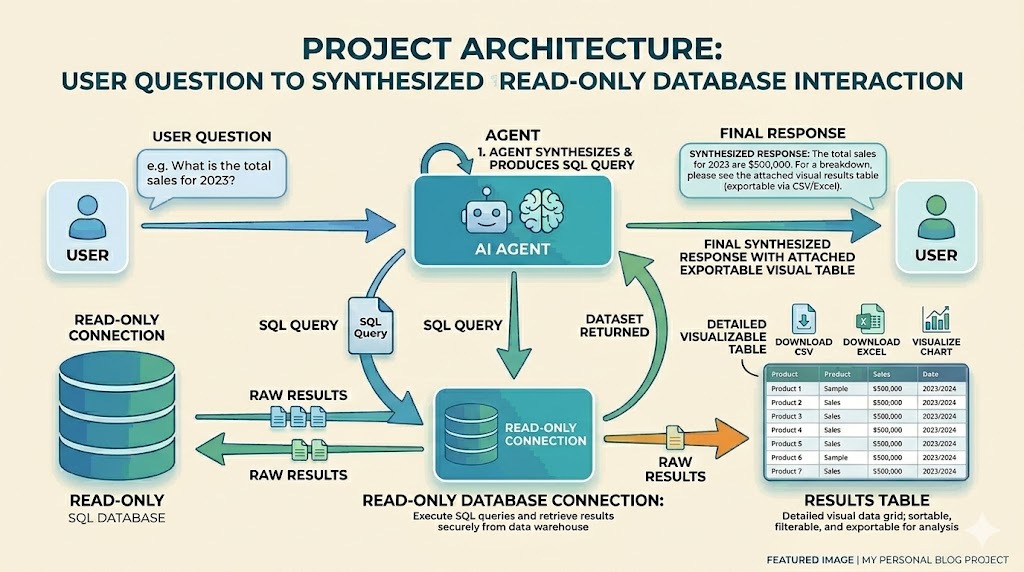
Saving my time with an AI Agent: Building a Natural Language Report Builder
An AI-powered reporting tool built with Laravel's AI SDK that lets non-technical team members query production data in plain English, removing the developer-as-gatekeeper bottleneck. Features schema-aware prompting, multi-layered SQL security, and conversational memory for iterative data exploration. Built solo in under four hours.
The Problem
In any data-rich application, there's a recurring pattern that rarely gets talked about: the developer-as-middleman. Operations needs a list of overdue learners. Education wants assessment completion rates by campus. Sales asks for enrolment numbers over the last quarter. Each request is reasonable, but none justifies a permanent dashboard — and each one lands on the developer's desk.
For the past two years, my workflow was the same: receive the request, mentally translate it into SQL, run it against the production database, export the CSV, and send it back. At some point I recognised a pattern — this part of my role was entirely procedural. The translation from intent to query was well-defined, the domain knowledge already lived with the people asking, and the steps were consistent enough to be delegated. What was missing wasn't expertise; it was an interface that could do the translation on their behalf.
I evaluated external tools like Wren AI, but the per-seat cost wasn't justified for a small team. What I needed was something contained within our existing application, secure enough to point at a production database, and accessible enough that a non-technical team member could use it without training.
The Approach
The core idea was straightforward: let users ask data questions in plain English, have an AI agent translate those into SQL, execute them against a read-only database replica, and present the results in an interactive table. The complexity lay in making this safe and context-aware — a naive text-to-SQL tool against an education platform with 80+ tables, multi-tenancy, and four different content delivery mechanisms would produce mostly wrong answers.
I built this on top of Laravel's AI SDK (laravel/ai), which provides agent abstractions, tool-calling orchestration, and conversation persistence out of the box. The UI lives inside our existing Filament admin panel as a Livewire page, keeping it within the established access control and authentication layer.
Implementation Highlights
Schema-Aware Prompting
The biggest factor in query accuracy isn't the LLM — it's the context you give it. The SchemaService introspects the reporting database at runtime, building a complete map of every table, column, data type, primary key, and foreign key relationship. This schema is cached for 24 hours and injected directly into the agent's system prompt.
But raw schema isn't enough. Our platform has domain-specific semantics that no LLM could infer from column names alone: the difference between subject_grade_user.type = 'default' (full enrolment) and 'sample' (trial access), or that progress tables are not tenant-scoped while content tables are. I added a configuration-driven annotation layer that attaches business context to each table, plus explicit documentation of common join patterns and the content hierarchy.
Multi-Layered SQL Security
Giving an AI direct database access demands paranoia. The security model operates in layers: the query tool validates SQL before execution, rejecting anything that isn't a SELECT or WITH statement. Data-modifying keywords (INSERT, UPDATE, DELETE, DROP, etc.) are caught with word-boundary regex — a subtlety that matters because columns like deleted_at and grant_amount would trigger naive substring matching. System schema access is blocked, multiple statements are rejected, and file I/O exploits (INTO OUTFILE, LOAD_FILE) are caught separately.
Beyond validation, every query executes on a dedicated read-only database connection with enforced row limits (2,500 max), query timeouts (30s), and per-user rate limiting (20 queries/minute). Every execution is audit-logged with the user ID, SQL, row count, and timing.
// Word-boundary matching: blocks DELETE but allows deleted_at
foreach (static::$forbiddenStatements as $keyword) {
    if (preg_match('/\b'.preg_quote($keyword, '/').'\b/i', $sql)) {
        return "Forbidden keyword detected: {$keyword}";
    }
}

// Substring matching for multi-word exploits
foreach (static::$forbiddenPhrases as $phrase) {
    if (stripos($sql, $phrase) !== false) {
        return "Forbidden keyword detected: {$phrase}";
    }
}Conversation Memory
Data exploration is iterative. A user asks for enrolment counts, then wants to drill into a specific campus, then filter by date range. The agent maintains full conversation history using Laravel AI's RemembersConversations trait, persisting messages to a dedicated conversations table. Each conversation is URL-addressable (?conversation={id}), so users can bookmark, share, and resume sessions. On reload, the last query's SQL is re-executed against the live database rather than serving stale cached results.
Key Code
The agent class itself is remarkably concise. Laravel's AI SDK handles tool orchestration, conversation serialization, and LLM communication — the agent just needs to declare its capabilities and provide context:
#[MaxSteps(5)]
#[MaxTokens(4096)]
#[Temperature(0.2)]
#[Timeout(120)]
class ReportAgent implements Agent, Conversational, HasTools
{
    use Promptable, RemembersConversations;

    public function instructions(): Stringable|string
    {
        $schema = app(SchemaService::class)->getFormattedSchema();
        // ... returns detailed system prompt with full schema,
        // domain rules, and response formatting guidelines
    }

    public function tools(): iterable
    {
        return [new RunQueryTool];
    }
}Row limits are enforced transparently. If the user's query already has a LIMIT, it's capped. If not, one is appended automatically:
protected function enforceLimit(string $sql): string
{
    $maxLimit = config('report-builder.row_limit', 500);

    if (preg_match('/\bLIMIT\s+(\d+)/i', $sql, $matches)) {
        if ((int) $matches[1] > $maxLimit) {
            $sql = preg_replace('/\bLIMIT\s+\d+/i', "LIMIT {$maxLimit}", $sql);
        }
        return $sql;
    }

    return rtrim($sql, "; \t\n\r") . " LIMIT {$maxLimit}";
}Results & Impact
The entire feature went from first idea to working proof of concept in under two hours, with another two hours spent on UX polish, prompt engineering, and edge case handling. This was built solo, in a gap between other priorities — the kind of work that typically gets deferred indefinitely because it's hard to justify a sprint for.
What it unlocked is significant: operations and education team members can now answer their own data questions without filing a request and waiting for developer availability. The conversational interface means they don't need to learn SQL or understand our schema — they just describe what they need in the same language they'd use in a Slack message. Results can be exported to XLSX directly from the interface for use in their existing reporting workflows.
The feature ships with full test coverage across three layers: unit tests for SQL validation (including edge cases around keyword matching), feature tests for the Livewire page (access control, rate limiting, state management), and integration tests for the agent itself.
Reflection
The most interesting aspect of this work wasn't the code — it was recognising that a repeatable part of my role could be cleanly abstracted into an agent. The pattern of "translate intent, generate SQL, export CSV" was well-defined enough that an AI could handle it reliably, and delegating it frees up engineering time for the work that actually requires engineering judgment. Meanwhile, the people closest to the data get direct access to it — on their terms, in their language.
If I were to extend this, I'd add saved queries that users can name and re-run on a schedule, and a library of prompt templates for common questions ("show me overdue learners in campus X"). The foundation is there — conversations are already persistent and URL-addressable. The constraint that shaped this feature — building it in hours rather than weeks — turned out to be a feature in itself: it forced focus on what mattered and cut everything that didn't.
You might also like
 blog
blog Building an AI Portfolio Agent with Laravel, pgvector, and Gemini
A chatbot that knows everything I've written — built with the Laravel AI SDK, pgvector embeddings, hybrid search, and Gemini's free tier.
 blog
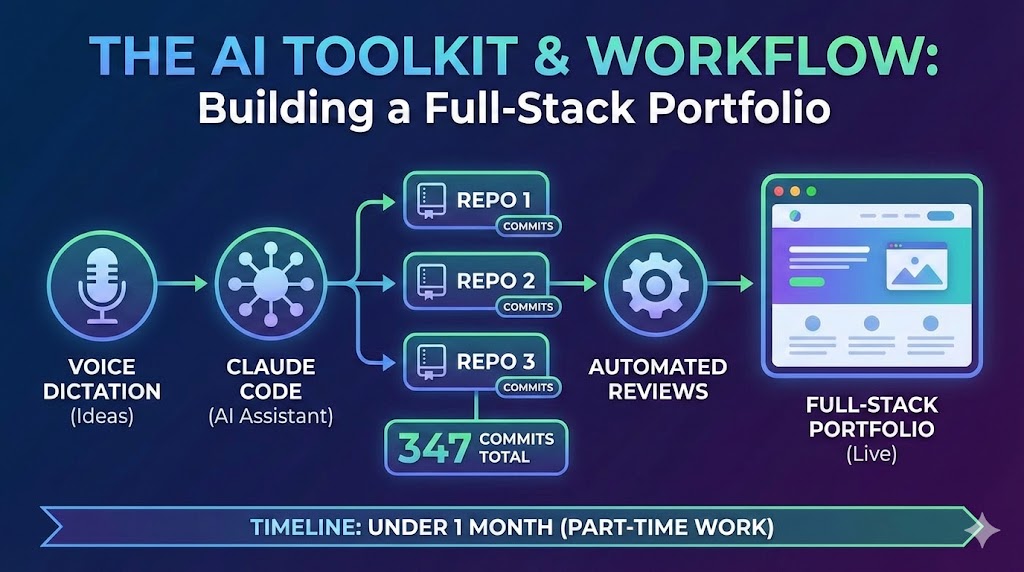
blog A Developer's AI Workflow: From Voice Dictation to Automated Reviews
The AI toolkit and workflow behind building three repositories, 347 commits, and a full-stack portfolio in under a month of part-time work — Claude Code, voice dictation, automated reviews, and more.
 blog
blog How I Built a Full-Stack AI Portfolio for Under $1/Month
Four hosting services, three repositories, an AI chatbot, semantic search, and cross-device content sharing — practically free.