Building an AI Portfolio Agent with Laravel, pgvector, and Gemini
A chatbot that knows everything I've written — built with the Laravel AI SDK, pgvector embeddings, hybrid search, and Gemini's free tier.
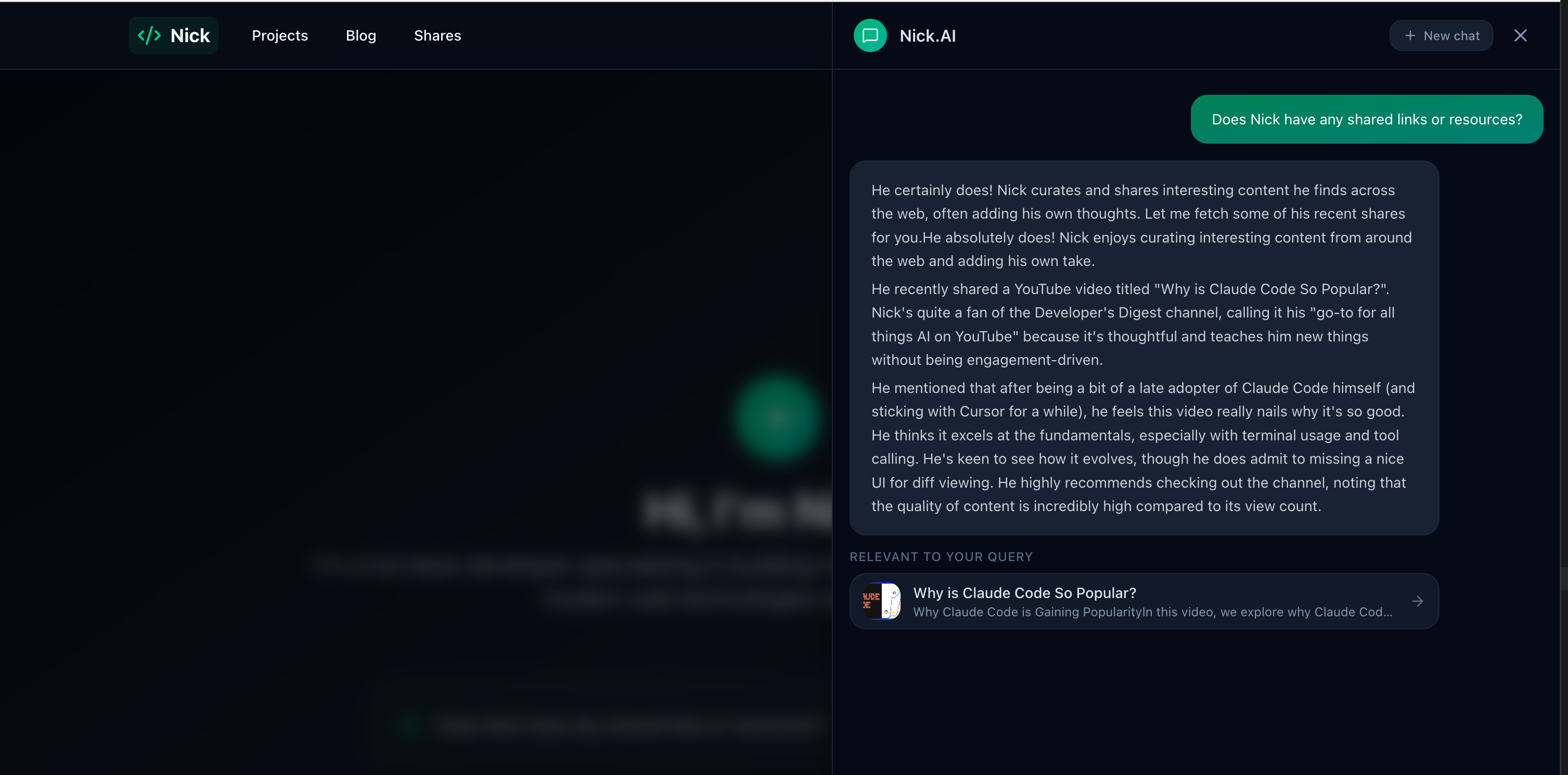
There's a chatbot on my site called sudo. Ask it about my projects, experience, or what I've been reading — it searches across everything I've written, synthesises an answer, and shows relevant content cards alongside its response.
It's not a wrapper around a prompt. It's an agent with tools: it decides what to search for, which endpoints to call, and how to combine the results. Here's how the whole system works, from embedding pipeline to streamed response.
The Embedding Pipeline
Every piece of content on the site — blog posts, projects, and curated shares — gets converted into a vector embedding that captures its semantic meaning. This happens automatically through a HasEmbedding trait shared across the Blog, Project, and Share models.
When a model is created or updated, the trait checks whether any embeddable fields have changed. If they have, it dispatches a GenerateEmbeddingJob to the queue. The job calls an EmbeddingService that sends the text to OpenAI's embedding API via Laravel AI's Embeddings facade and stores the resulting 1536-dimensional vector in a pgvector column on the model.
Each model defines what text gets embedded through a getEmbeddableText() method. Blogs embed their title, excerpt, and content (stripped of HTML). Projects add their technology names ("Technologies: Laravel, React, TypeScript"). Shares include the user's commentary ("My thoughts: ..."). This means a search for "machine learning" can surface a share about an ML article even if the URL itself is opaque.
The job has sensible resilience: three retries with exponential backoff (30s, 60s, 120s). If the OpenAI API is temporarily unavailable, the content still saves — it just won't be semantically searchable until the job succeeds on retry.
Hybrid Search
Vector search alone isn't enough. It catches semantic similarity — "AI assistant" matches "chatbot" — but it can miss exact terms. Keyword search catches those exact matches but misses meaning. The solution is hybrid search with Reciprocal Rank Fusion.
The SearchService runs both strategies in parallel for each content type:
Vector search embeds the query string, then uses pgvector's cosine distance to find the nearest neighbours. Results must exceed a minimum similarity threshold of 0.3, and each content type returns up to 5 results.
Keyword search uses PostgreSQL ILIKE with AND semantics — every search term must appear in at least one of the searchable fields. For projects, this extends to associated technology names, so searching "React" finds projects tagged with that technology even if "React" doesn't appear in the description.
Reciprocal Rank Fusion (RRF) combines both result sets using the formula 1 / (k + rank) with k=60. Each document gets a score from each strategy based on its rank position. Documents appearing in both result sets accumulate scores from both, giving them a natural boost. The fused results are sorted by combined score and the top 5 are returned.
Why k=60? It's a standard RRF constant that prevents top-ranked results from dominating too aggressively. A document ranked #1 in vector search and #3 in keyword search will reliably outrank a document that's #1 in only one strategy. The value is well-established in information retrieval literature.
The whole pipeline falls back gracefully: on SQLite (used in tests), vector search is unavailable, so the service switches to keyword-only LIKE queries automatically.
The Portfolio Agent
The chatbot isn't a simple prompt-and-response system — it's built as an agent using Laravel AI. The PortfolioAgent class implements the Agent, Conversational, and HasTools interfaces, giving it the ability to hold multi-turn conversations and decide which tools to call.
Configuration is declarative via PHP attributes:
- Model: Gemini 3 Flash Preview (Google's free tier)
- Temperature: 0.6 — conversational but grounded
- Max steps: 7 tool calls per turn
- Max tokens: 2048 per response
The agent has eight tools at its disposal:
- SearchContent — hybrid semantic + keyword search across all content types
- GetBlogs — list recent published blog posts
- GetProjects — list projects, optionally filtered by technology
- GetShares — list recently curated links and resources
- GetBlogDetail — fetch the full content of a specific blog post
- GetProjectDetail — fetch full project details including technologies
- GetTechnologies — list all technologies with project counts
- GetCVDetail — fetch detailed CV and work experience
The system prompt establishes sudo's personality (sharp, conversational, dry wit) and gives it clear rules: always search before assuming, paraphrase rather than dumping raw results, keep responses concise. Contact information and a CV summary are injected dynamically from a UserContext model, so I can update my professional details through the Filament admin panel without touching code.
The tool descriptions are carefully worded to guide the agent's decisions. GetBlogs explicitly says "Do NOT use this to search for posts about a specific topic — use SearchContent instead." This prevents the agent from listing all blogs when the user asks about a particular subject.
Streaming to the Frontend
The ChatController handles the conversation lifecycle. When a message arrives, it resolves or creates a conversation (identified by a UUID), loads the last 20 messages for context, and streams the agent's response via Server-Sent Events.
The response is a standard SSE stream with two event types the frontend cares about: text_delta events that build up the response text character by character, and tool_result events that the frontend renders as content reference cards (blog post previews, project summaries, share links).
Message persistence happens asynchronously after streaming completes — a then() callback on the streaming response saves both the user message and the assistant response (including tool calls, tool results, and token usage) to the database. This means the user sees the response immediately while the database write happens in the background.
Rate limiting is set to 10 requests per minute per IP. Input validation keeps messages between 2 and 500 characters. The conversation ID travels in the X-Conversation-Id response header so the frontend can maintain context across messages.
What Building This Taught Me
The agent architecture reinforced several principles. Hybrid search consistently outperforms either strategy alone — the RRF fusion catches cases that would slip through a pure vector or pure keyword approach. Tool descriptions matter as much as system prompts; poorly described tools lead to the agent making bad decisions about when to use them. And streaming SSE is worth the implementation complexity — the perceived responsiveness is dramatically better than waiting for a complete response.
The entire AI layer — embeddings, search, agent, streaming — runs on free tiers except for the embedding API calls, which cost cents per month. For a portfolio project, that's a compelling proof of concept for RAG-powered agent architectures.
This is part of the Building nickbell.dev series. Read about the sharing ecosystem or Filament as a headless CMS.
You might also like
 blog
blog How I Built a Full-Stack AI Portfolio for Under $1/Month
Four hosting services, three repositories, an AI chatbot, semantic search, and cross-device content sharing — practically free.
 project
 nickbell.dev
A full-stack AI portfolio running across four hosting services and three repositories — React frontend, Laravel API, AI chatbot agent with semantic search, and a cross-device sharing ecosystem. Total cost: under $1/month.
 project
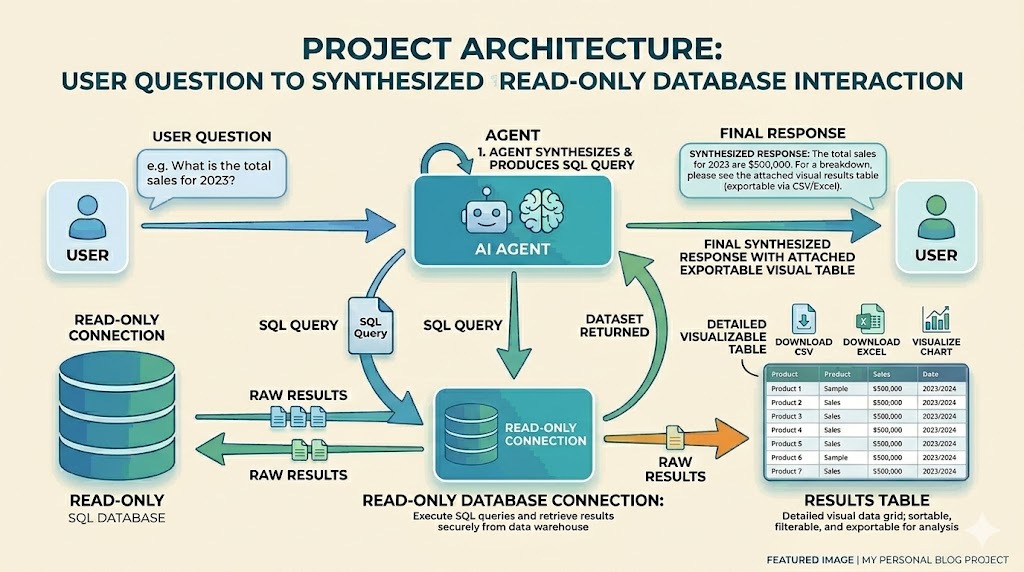
 Saving my time with an AI Agent: Building a Natural Language Report Builder
An AI-powered reporting tool built with Laravel's AI SDK that lets non-technical team members query production data in plain English, removing the developer-as-gatekeeper bottleneck. Features schema-aware prompting, multi-layered SQL security, and conversational memory for iterative data exploration. Built solo in under four hours.