How I Built a Full-Stack AI Portfolio for Under $1/Month
Four hosting services, three repositories, an AI chatbot, semantic search, and cross-device content sharing — practically free.
My portfolio runs across four hosting services, three repositories, and includes a conversational AI agent that can search everything I've written as well as my work history. The only cost is a few cents a month for AI embeddings.
That's not a toy demo. The site serves a blog, project showcases, curated content shares, semantic search powered by pgvector, and a chatbot agent with many specialised tools. The total comes to well under a dollar a month.
Yes this is quite a lot for a personal site. Here's how the architecture works, and why each piece exists.
The Architecture
Six services, each chosen for what it does best:
Netlify serves the frontend — a React 19 single-page application built with TypeScript, Vite 7, and Tailwind CSS v4. Static hosting with a global CDN. Deployment is a git push.
Render runs the Laravel 12 API — PHP 8.4 with a Filament v5 admin panel, Docker-containerised. This is the hub: every other service connects through it.
Supabase provides PostgreSQL with the pgvector extension enabled. One database handles both relational content and 1536-dimensional embedding vectors — no separate vector database needed.
Cloudflare Pages hosts the Shares PWA, a lightweight vanilla JS progressive web app for saving links from my phone. DNS was already managed on Cloudflare, so deployment is another git push.
Gemini (Google's free tier) powers the AI chatbot agent. Gemini 3 Flash Preview handles multi-turn conversations with tool calls at zero cost.
A Chrome Extension provides the desktop companion for sharing — one click from any browser tab sends the current URL to the API with optional commentary.
Why Separation of Concerns
At work, I build full-stack Laravel applications with Vue.js and Inertia. Productive, battle-tested, and entirely monolithic. This site deliberately takes the opposite approach.
I wanted to learn React properly — not through a meta-framework like Next.js, but vanilla React with hooks, client-side routing, and manual state management. Separating the frontend into its own repository forced me to think about API contracts, CORS configuration, and SPA authentication in ways a monolith never would.
The architecture mirrors enterprise patterns: the API serves multiple consumers (React frontend, PWA, Chrome extension, AI agent), each deploying independently. When I save a link from my phone at midnight, the PWA hits the same API endpoint the Chrome extension uses, and the AI chatbot can find that link within seconds through the same search pipeline.
Each repository stays focused. The shares tools are micro-apps — vanilla HTML, CSS, and JS with no build tools. Adding a framework would have added more complexity than the apps themselves contain.
Free Tier Engineering
Running on free tiers isn't just about saving money — it's an engineering constraint that forces good decisions.
Cold start mitigation: Render's free tier spins services down after inactivity. A scheduled job on cronjob.org hits /api/warm-cache at regular intervals, which triggers the WarmApiCache command. This doesn't just keep the server alive — it pre-warms every public endpoint (featured content, indexes, individual detail pages) so the first real visitor gets a cached response, not a cold database query.
Cache-first, always fresh: Every API response is cached for 24 hours. The ClearsApiCache trait on Blog, Project, and Share models automatically busts relevant cache keys whenever content changes. Publish a new blog post in Filament, and the cached index, featured, and show endpoints clear instantly. The next request rebuilds the cache. Aggressive caching with zero staleness risk.
One database, two jobs: Supabase gives PostgreSQL with pgvector on the free tier. The same database that stores blog posts also stores embedding vectors for semantic search. No separate vector database, no additional service, no additional cost.
Free AI: Gemini 3 Flash Preview's free tier handles the chatbot agent, including multi-turn conversations with tool calls. OpenAI handles embeddings because their models are best-in-class for retrieval, but at text-embedding-3-small pricing the monthly cost is measured in cents.
What It Actually Does
The architecture isn't academic — it enables real features:
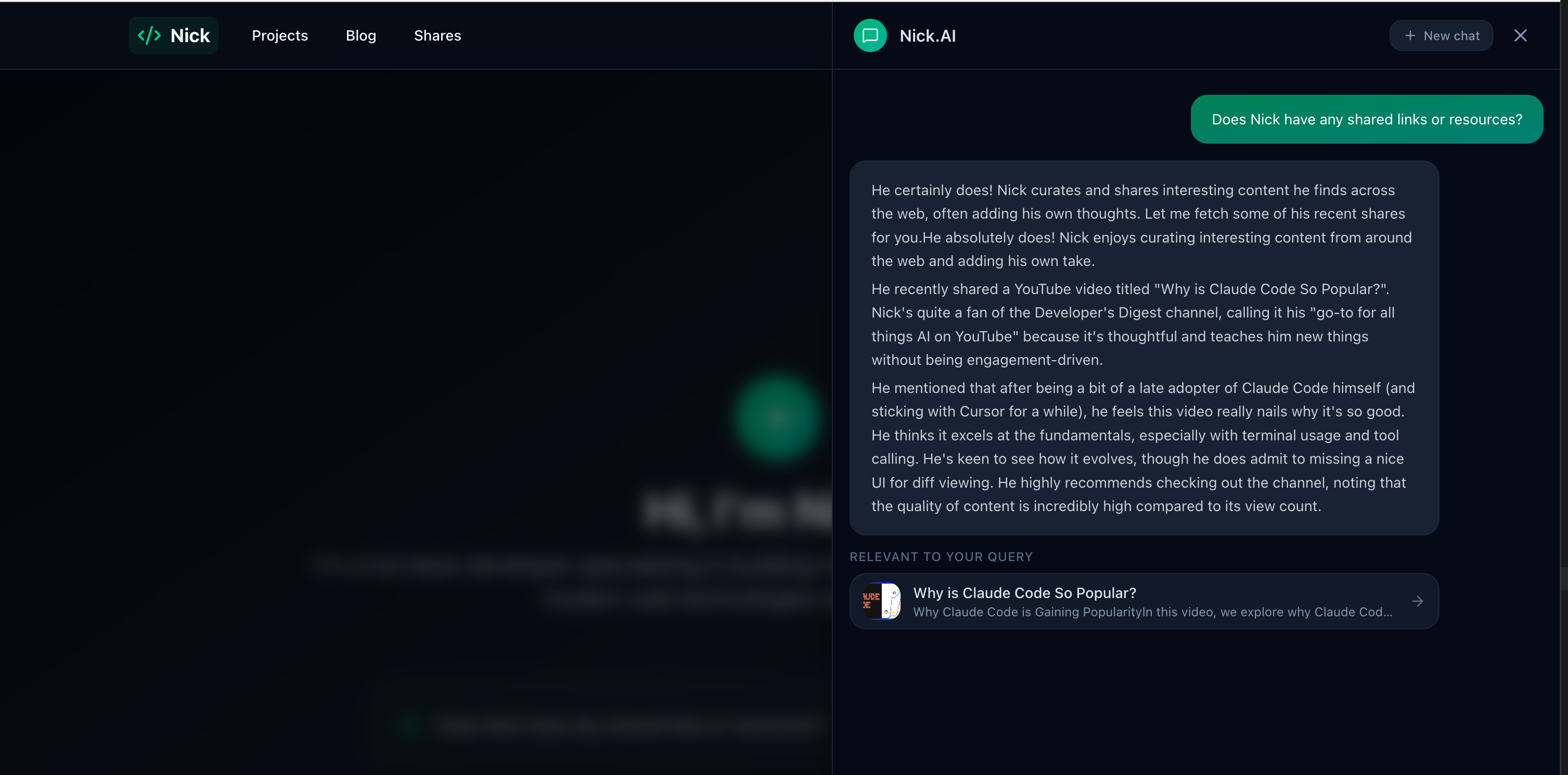
AI chatbot agent: A conversational assistant called "sudo" with eight tools that can search content semantically, retrieve blog posts and project details, check my tech stack, and pull CV information. It streams responses in real-time with content reference cards. The full technical breakdown is in Building an AI Portfolio Agent with Laravel, pgvector, and Gemini.
Semantic search: Every blog, project, and share gets automatically embedded when created or updated. Search uses hybrid vector + keyword retrieval with Reciprocal Rank Fusion — "AI assistant" finds the chatbot, and "Laravel" finds the exact framework match.
Cross-device sharing: Interesting links get saved from my phone (PWA via the native share sheet) or desktop (Chrome extension). The API auto-extracts metadata via OpenGraph scraping, with special handling for YouTube, X (Twitter) and LinkedIn. Every share is immediately searchable by the AI agent. More detail in Sharing Content From Anywhere.
Headless CMS: Filament v5 provides rich text editing, image uploads, preview URLs, and a draft/publish workflow — all feeding the decoupled React frontend through versioned API resources. See Filament v5 as a Headless CMS for the details.
The Stack
| Layer | Technology | Hosted On | Cost |
|---|---|---|---|
| Frontend | React 19, TypeScript, Vite 7, Tailwind v4 | Netlify | Free |
| Backend | Laravel 12, PHP 8.4, Filament v5 | Render | Free |
| Database | PostgreSQL + pgvector | Supabase | Free |
| Shares PWA | Vanilla JS, Web Share Target API | Cloudflare Pages | Free |
| AI Chat | Gemini 3 Flash Preview | Google Cloud | Free |
| AI Embeddings | OpenAI text-embedding-3-small | OpenAI | ~cents/mo |
| Admin | Filament v5 | Render (same service) | — |
Every feature on this site was built to learn something specific: React hooks and client-side routing, AI agent orchestration, retrieval-augmented generation, PWA share targets, Chrome extension development, pgvector hybrid search. The architecture supports all of it, and the learning transfers directly to professional work.
The portfolio-as-playground philosophy means the site is never "done" — it's a living project that evolves as I explore new technologies. The fact that it all runs for under a dollar a month proves the approach is practical, not just ambitious.
This is the first in a four-part series on building nickbell.dev. Next: the AI agent architecture, the sharing ecosystem, and Filament as a headless CMS.
You might also like
 project
 nickbell.dev
A full-stack AI portfolio running across four hosting services and three repositories — React frontend, Laravel API, AI chatbot agent with semantic search, and a cross-device sharing ecosystem. Total cost: under $1/month.
 blog
blog Building an AI Portfolio Agent with Laravel, pgvector, and Gemini
A chatbot that knows everything I've written — built with the Laravel AI SDK, pgvector embeddings, hybrid search, and Gemini's free tier.
 blog
blog Sharing Content From Anywhere: PWA, Chrome Extension, and a Laravel API
A Progressive Web App and Chrome Extension that let me save and annotate interesting content from my phone or browser, with automatic metadata extraction.